[[trackingImage]]

Managing Premium Finance Loans with FIRST Insurance Funding

Thank you for your business. We want taking care of your policyholders to be easy and hassle-free. Please review this guide and bookmark this page for future reference.

ABOUT FIRST INSURANCE FUNDING (FIRST)

FIRST is one of the largest premium finance companies in North America:


  • $18 Billion in loans financed annually
  • Over 35 years of experience
  • Backed by the financial muscle of Wintrust, a $71+ Billion financial holding company (Nasdaq: WTFC)
  • Complete financing options for all of your policyholders

USING INSTANT BIND & DOWN PAYMENTS with E-COMPLETE

If you are using Instant Bind: Watch this quick demo.


The policyholder will receive an email from Cover Whale with a SECURE link to sign the Premium Finance Agreement (PFA). They will sign their PFA using DocuSign and then use the provided e-Complete link to make their down payment using their bank account or credit card.


You can view the policyholder's experience in this short video.

MANUAL BINDING & DOWN PAYMENTS with ePayPolicy

The policyholder will receive an email from Cover Whale with a SECURE link to sign the Premium Finance Agreement (PFA) using Docusign. They will sign their PFA using DocuSign and then use the provided link to make their down payment directly to Cover Whale using ePayPolicy.

NOTICE OF ACCEPTANCE (NOA) & WELCOME LETTER

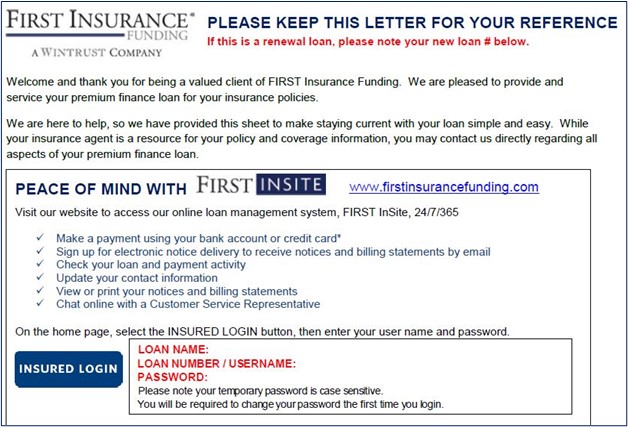
After making the down payment, your policyholder will receive a Notice of Acceptance (NOA) as well as a Welcome Letter from FIRST with directions for managing their loan and making payments in FIRST InSite, our online account management platform.


Policyholder LOGIN credentials for FIRST InSite are explained in the Welcome Letter.

While logged in, they can:

  • Make a one-time payment via bank account or credit card
  • Set up automatic payments
  • Check on the status of their loan including past due amounts or loan balance
  • Print documents
  • Change their contact info


Empower your policyholders to use FIRST InSite, our online account management system – you will both save time!

FOR EVERYTHING YOU WANT TO KNOW ABOUT YOUR FIRST LOANS,

LOG INTO FIRST INSITE


NEED LOGIN CREDENTIALS OR FORGOT THEM? Click here


NEED A LOGIN FOR ANOTHER USER? Click here

CHECKING A LOAN

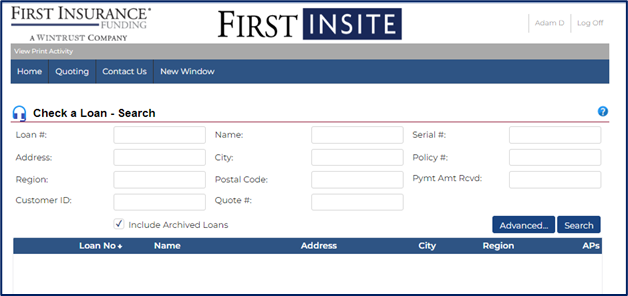
Search by LOAN # or NAME or go to Home tab and select Check a loan


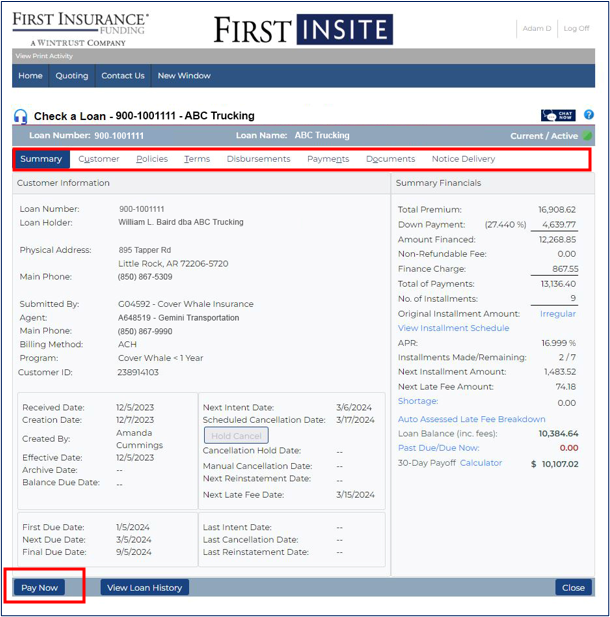
The Loan Summary page shows contact information, payment due dates and a financial snapshot of the loan – including a loan payoff calculator.


For more detailed information, use the tabs that are shown in the RED BOX below.

For policyholder payment options, click here.

CUSTOMER TAB

·        Change contact information

·      Enroll in GO PAPERLESS!

POLICIES TAB

  • Details of policies financed
  • Endorsements
  • Unearned premium return method


TERMS TAB

  • Billing cycle
  • ACH or credit card details
  • Rate and payment amount details

DISBURSEMENTS TAB

Payment of premium details:

  • Method
  • Dates
  • Amounts

PAYMENTS TAB

Down payment and installment details

  • Method
  • Dates
  • Amounts
  • Next payment due

DOCUMENTS TAB

List of documents that have been generated related to the loan:

  • Download
  • Print
  • Share PDF

NOTICE DELIVERY TAB

·        Select delivery option for notices

·        Change e-mail address

Why does the PFA say "VOID"?


How do I update/change the PFA?


Can I add a non-Cover Whale policy to the PFA?


How do I sign my insured up for automatic payments?


My policyholder's loan is in cancelled status. What can be done?


I have existing loans with FIRST that are setup with another login. Can I use the same login to view my loans booked through Cover Whale?

This PFA is for reference only and should not be signed. When you submit a quote using Instant Bind, your policyholder will receive a link to sign the actual PFA, without a "VOID" watermark.


Any changes to the PFA must be submitted through the Cover Whale platform.


No. Non-Cover Whale policies must be financed directly with FIRST on a separate PFA.


Agents cannot sign policyholders up for automatic payments with FIRST. The policyholder can sign up during the completion of the e-Complete process. Or, once FIRST accepts the loan, your policyholder can log into FIRST InSite to sign up for recurring automatic payments by bank account or credit card.


To avoid cancellation of the policy, payment in FULL for the amount currently due must be received. Payment by credit card, wire transfer, or certified funds such as a cashier's check will allow FIRST to make a Request for Reinstatement to the insurance carrier(s) the next business day. Check and ACH payments may delay a Request for Reinstatement up to 5 business days.

Verify policy status through Cover Whale.


Yes, for help updating your user setup please contact marketing@firstinsurancefunding.com

RENEWALS: Learn about our ADVANTAGE 10/10 Program here.

For all other questions, email hello@coverwhale.com

  • Commissions
  • Policy coverage
  • Financing an endorsement